Where Employee Needs
Meet HR Support
Bring employee questions, requests, and HR assistance into one organized HR Helpdesk with HRCRM, making support easier to access, manage, and resolve.

0% Complete
4 documents pending
Trusted by 1,600+ Companies Worldwide
One Place for Everyday HR Support
HRCRM brings employee questions, service requests, policy queries, and workplace support into one HR Helpdesk, giving employees an easy way to seek help and HR teams organized workflows.
Why HR Teams Choose HRCRM
HRCRM brings employee inquiries and support workflows together, helping HR teams resolve questions faster, stay organized, and deliver a reliable service experience.
Requests Stay Organized
Keep employee questions and HR requests structured, visible, and easier to manage from one central place.

Answers Stay Accessible
Give employees a convenient way to find relevant information without repeatedly reaching out to HR for common questions.

Every Request Has Context
Keep important details together so HR teams can understand requests and respond without unnecessary back-and-forth.

Priorities Stay Visible
Help HR teams distinguish urgent concerns from routine requests and focus attention where it matters most.

Support Stays Consistent
Create a more reliable employee support experience by handling similar HR questions and requests through structured processes.

HR Keeps Moving
Reduce scattered conversations and manual follow-ups so HR teams can spend more time resolving employee needs.
Essentials for Better HR Support
From tracking time away to keeping everyone aligned on holidays and approvals, HRCRM brings the core parts of leave management into one organized process.
Ticket Management
Capture, organize, prioritize, and track employee HR requests from submission through resolution, keeping every support issue visible and accountable.
Whistleblower Portal
Provide a secure channel for employees to report sensitive workplace concerns, helping organizations receive and manage reports with greater discretion.
What Better HR Support Unlocks

Reduce administrative workload caused by repetitive employee questions and requests.

Create clearer accountability around employee concerns and follow-ups.

Improve employee confidence when seeking help from HR.

Help HR teams identify common problems requiring broader policy or process changes.

Shorten resolution cycles for routine workplace support issues.

Protect organizational trust with appropriate channels for sensitive reports.

Maintain better records of recurring workplace issues and support needs.

Create a more responsive workplace where employees know where to turn.
Four Steps to Streamlined HR Support
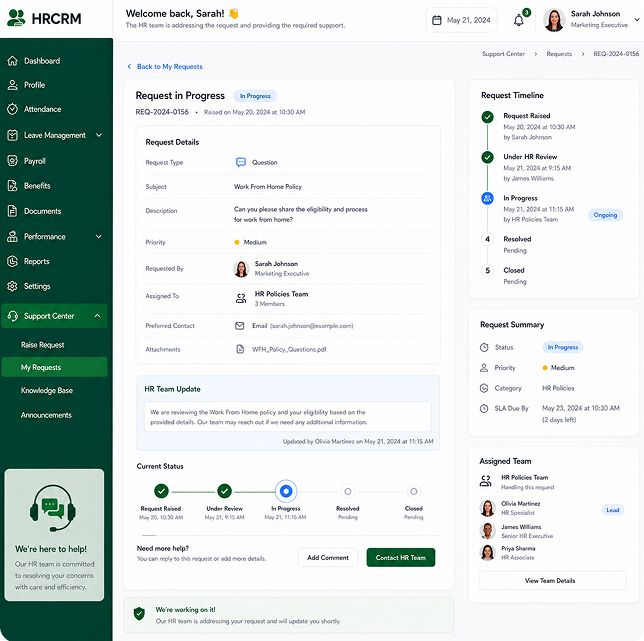
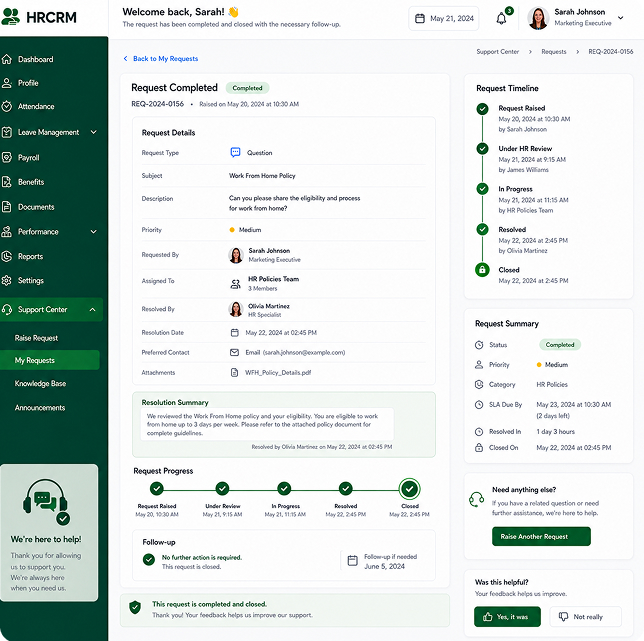
Set Up Ticket Categories
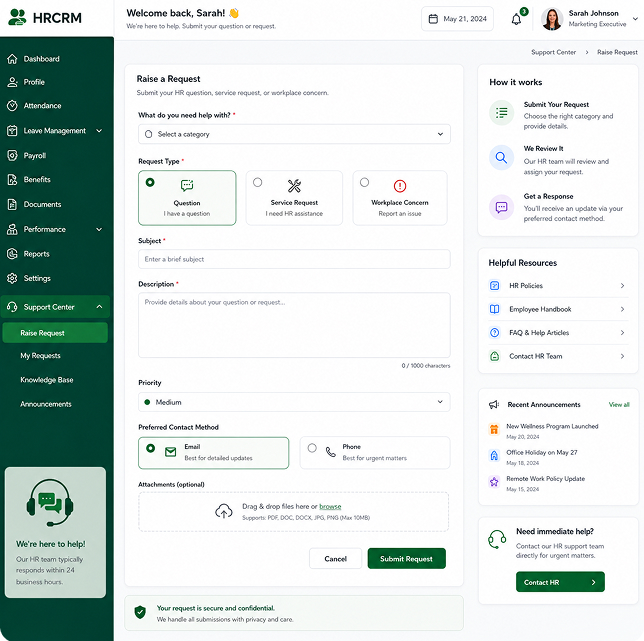
Define support categories like Payroll, Benefits, Policy, and Workplace Concerns.
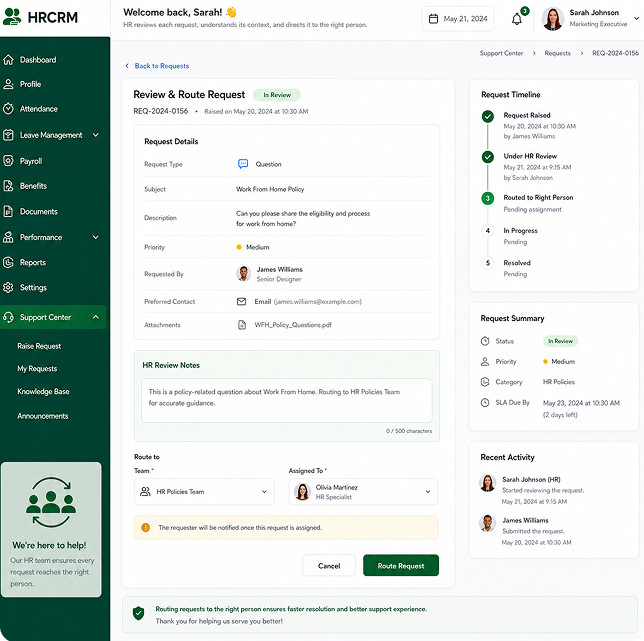
Configure Automated Routing
Assign tickets to specific HR team members automatically based on request type.
Enable Employee Portal
Provide employees with self-service access to submit requests and track progress.
Monitor Resolution Quality
Track response SLAs, resolution times, and employee satisfaction feedback.
Performance Management for Every Kind of Workplace
Different types of organizations have different roles, expectations, and performance cultures. HRCRM helps adapt performance management to support teams across industries and business stages.
Small Businesses
Create structured goals and performance conversations without adding any unnecessary complexity to the growing HR operations.
Growing Startups
The platform helps keep fast-moving teams aligned with the evolving priorities through regular feedback, clear goals, and development conversations.
Mid-Sized Companies
HRCRM brings consistency to performance reviews, goal setting, feedback, and employee development across expanding departments.
Large Enterprises
Manage structured performance cycles across departments, locations, teams, managers, and diverse employee groups.
Educational Institutions
Support faculty, administrative, and support staff with structured evaluations, goals, feedback, and professional development.
Healthcare Organizations
Create consistent performance processes for clinical, administrative, and support teams with varied responsibilities.
IT & Software Companies
Connect employee objectives and development with rapidly changing technical, product, engineering, and business priorities.
Manufacturing Businesses
Support performance management across production, operations, quality, management, and support teams.
Professional Service Firms
Align consultants, advisors, managers, and support teams with client expectations and broader business objectives.
Transform Employee Support Across Your Organization Today
Centralize employee management, automate everyday HR processes, and empower your team with a secure, scalable platform designed for business growth.
Frequently Asked Questions
What is an HR Helpdesk?
An HR Helpdesk is a centralized ticketing system that allows employees to submit questions, service requests, and grievances while enabling HR teams to assign, track, and resolve issues efficiently.
How does ticket routing work?
HRCRM automatically routes tickets to designated HR personnel based on the request category (e.g. Payroll, Benefits, Leave, Policy) and urgency level.
Is the Whistleblower portal confidential and secure?
Yes, the Whistleblower portal provides an encrypted, anonymous submission channel so employees can safely report sensitive workplace misconduct or compliance concerns.
Can we set SLAs for ticket resolution?
Yes, administrators can set Service Level Agreements (SLAs) with automatic escalation rules if tickets are not addressed within defined timeframes.