

The team members in every business require knowledge about their coworkers, the specific roles these coworkers perform and the methods available to reach them. The workers in a small firm share the details through casual conversations. But when the number of workers increase, teams move to different sites, or professional responsibilities shift, the employee-data starts becoming outdated or incomplete.
The employee directory is a solution for these problems because it gathers necessary data about the workforce in a single place that administrators manage and employees can search as well. It helps the daily work that colleagues do together, allows recent recruits to locate the correct points of contact with more speed and provides a dependable model of the company hierarchy for the human resource department. This article explains what is an employee directory, what it contains, it’s benefits and how to create one.
What Is an Employee Directory in HR?
The employee directory is a central database where staff members search for information about the roles and contact methods of their coworkers. The human resources department maintains this tool so that colleagues can find and talk to each other within the company. It lists the name, professional title, specific department, manager, office site plus phone number or emails of every worker. The goal of this tool is to decrease the duration of time that staff spend when they look for the right person or team.
Differences Between the Employee Directory, HRIS & Organization Chart
Those three resources connect to one another, but each serves a specific purpose.
Employee directory:
This is a tool that staff use to find individuals and their communication details.
Human resources information system (HRIS):
This is a database that stores and manages private employment records. It contains data about salary payments, health insurance, job evaluations but also legal documents. Only managers with permission can view this information.
Organization chart:
This is a diagram that shows the reporting levels and the chain of command. It displays how the company is built but does not usually provide phone numbers or email addresses.
In many cases the directory receives its data from the HRIS, it sometimes includes an organization chart to help staff navigate the company.
What Information Is Included in an Employee Directory?

The content of an employee directory usually includes various kinds of essential information that enables them to recognize other members of staff, their role, and how they can be contacted within your organization. Depending on your organization’s size, structure, operational needs, and privacy policies, this might include different things. A well-organized HR information system can help businesses manage employee information and keep essential workforce records accessible to the right people.
Common details in an employee directory include:
Employee’s Full Name and Profile Photograph:
It would be good to have an employee’s complete name as well as his/her profile photograph if available to facilitate easy recognition of such an employee by other members of staff.
Designation / Job Title and Department: It helps members to find each other’s designation or job title as well as their primary department of operation.
Work Email Address / Business Phone Number / Office Extension:
This section may contain the work email address, business telephone number, and any other contact details, for example Slack ID.
Reporting Manager:
Name/Position of direct supervisor for clarity around who someone reports to and who they can escalate things to.
Office Location:
This should be your office address, building/floor (or other designated work location) if you have multiple ones.
Team, Employment & Work Location:
You may choose to include team membership here along with their work location and employment status depending on what’s relevant internally.
Include Professional Skills & Expertise:
Areas of specializations, certifications, or professional interests can be useful for teams searching for someone who might have certain skills on their side.
Other employee data could be added here too if your employee directory contains them. Modern ones usually contain things like organisational charts, employee profiles, or links to internal communication tools.
But make sure there’s no sensitive information being disclosed that doesn’t relate to actual employment needs. This means you shouldn’t share private phone numbers, home addresses, or personal identification information unless it has been authorized to do so.
How Does an Employee Directory Work?
The employee directory is a centralized system that allows users to search for information. It collects verified data about workers and shows specific parts of that data to users who have permission. Its operation is based on four connected parts – data sources, synchronization, access controls and search.
Data sources are important components – majority of modern directories receive primary records from the human resources information system, this system is the official source for names, job titles, departments, management hierarchies plus office locations. Some organizations add information from an identity provider or a corporate directory service. Microsoft Entra ID or Google Workspace are examples of services that keep contact details and account status current.
Synchronization keeps the system accurate – integrations update the directory automatically when an administrator changes a record in the source system. The directory shows a new hire, a job level change, a lateral move or a contract ending within minutes or hours. Effective system integrations help businesses synchronize information across different platforms and maintain consistent records.
Access controls – permissions based on the role of a user define which fields that user can view. A typical worker can see the job title, department but also work email of a colleague. In contrast a human resources administrator is also able to see the dates when a worker started or other restricted details. The standard view does not include private information like home addresses or salary amounts.
Search and navigation help users find colleagues – workers find other staff – typing keywords or – using filters for departments.
What Are the Benefits of an Employee Directory?

An employee directory is beneficial for your business because employees can connect with other teams quickly, teams can measure the amount of work staff complete, the shared habits of the group and the way leaders control the organization. The most important advantages are in the following descriptions.
The staff reach colleagues and those with specialized knowledge at a high speed. The employees use many hours when they try to find a specific coworker, a functional unit or an individual with specific expertise. A digital tool that allows for searching decreases this difficulty because it shows job titles, management structures and methods of contact in one place.
There is more cooperation between different functional departments. With clear views of the structure of an organization, employees are able to find who have an interest in a project in different departments, physical sites and time zones – this is useful for teams who work in different locations or use a mix of office and home environments.
To make the integration of new staff efficient, new employees produce results earlier because they identify their supervisor, their coworkers and important contacts without a need for many introductions. A structured employee onboarding process helps new hires understand their roles, connect with coworkers, and become productive sooner.
How to Create an Employee Directory
Creating an effective employee directory starts with good planning and governance around your employees’ data. Here’s how you do this step by step:
Step 1:
Decide what purpose your directory serves, e.g., finding people, helping with employee onboarding, and managing emergency contact details.
Step 2:
Choose which data fields to include, including basic fields such as name, job title, department, work email, phone number, office location, and their reporting line, then classify these data types as either public, restricted or confidential.
Step 3:
Exclude unnecessary data. Only include fields relevant to your identified purposes (e.g., don’t store someone’s marital status because that is irrelevant in the organization).
Step 4:
Pick your platform. You could go for a spreadsheet, an intranet page, a dedicated directory app or the directory module of your HRIS.
Step 5:
Validate emails and other types of data. If possible, collect all existing records into one place, perhaps through your HRIS, payroll, identity management system or otherwise. Then check for inconsistencies and clean up duplicate data.
Step 6:
Set up access and privacy controls. It’s important to create different levels of permission based on roles within the organisation. Allow employees to check out their own data but ensure the right level of detail isn’t visible to those who shouldn’t have it, e.g. mobile numbers are often kept private.
Step 7:
Automate updates. Connect your directory to your HRIS system so that hires, transfers, promotions, and terminations show up automatically instead of manually.
Step 8:
Launch, train, & measure. Announce the launch of your directory via your company’s internal communications channels.
Employee Directory vs. Employee Database
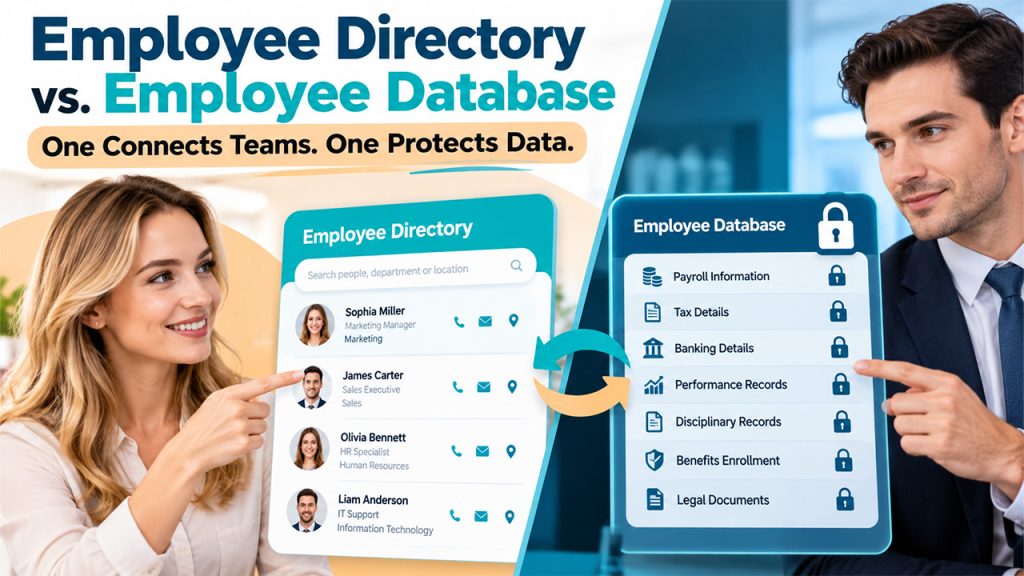
Even though the two terms are frequently used in the same way, an employee directory and an employee database have different purposes and are aimed at different groups of people.
An employee directory is a reference document which is simplified and searchable for general use within the organisation. It usually includes employees’ contact information, their job titles, the departments they are in, their locations and their reporting relationships. Its main purpose is to enable employees to identify one another and to get in touch with them quickly. Access to it is usually granted to all members of the workforce.
By contrast, an employee database is a detailed record-keeping system looked after by the human resources department. It contains confidential and regulated information such as pay, tax and banking details, performance appraisals, disciplinary records, details of benefits enrolment and legal documents. Access to it is controlled according to users’ roles and the system is subject to data protection requirements like the General Data Protection Regulation (GDPR) in the relevant jurisdictions.
The two can best be seen as complementary. In most well-established organizations the directory selects only a limited and approved number of fields from the database, which acts as the official source. This setup maintains the accuracy of the directory without the need for manual updates, at the same time ensuring that sensitive information stays protected in the database.
Conclusion
The employee directory is a component of the organization’s infrastructure. It offers an accurate and accessible record of staff members and their positions and the way they communicate with one another. Employee directory allows for communication and better collaboration. Its value is based on governance. Careful governance includes defined data fields, the assignment of responsibility, role-based access controls and frequent synchronization (using webhooks and APIs) with the system of record.
When organizations regard the employee directory as an asset that is kept up to date rather than as a fixed list, it gives teams greater and faster response times. Since workforces are becoming more dispersed, a reliable employee directory is a necessity, for effective coordination.
Frequently Asked Questions
What is an employee directory in HR?
An employee directory is a centralized record of employees' names, job titles, departments, contact details, etc. (depending on your organization and its structure).
What information should an employee directory include?
Mostly it includes employee names, job titles, departments, work email, phone numbers, and reporting managers. But not sensitive information.
What are the main benefits of an employee directory?
It improves internal communication, employee searches, clarifies roles, supports collaboration.
How often should an employee directory be updated?
HR teams should update the directory whenever employee details change and review records periodically to maintain accuracy.
What is the difference between “employee directory” and an ‘employee database”?
Employee directory provides contact and organizational details; on the other hand, an employee database stores more detailed records of teams for HR managers.