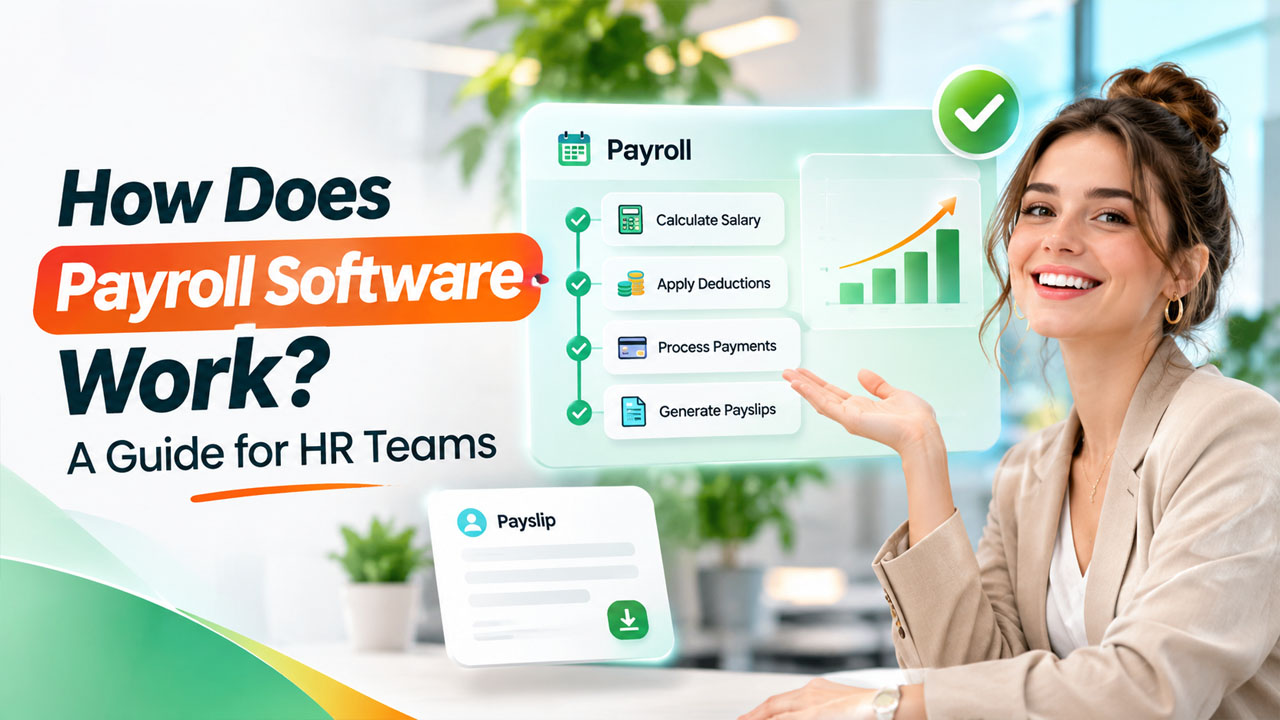

Managing employee salaries is one of the most important responsibilities of an HR department. From calculating monthly wages and tracking attendance to handling tax deductions and generating payslips, payroll involves several tasks that require accuracy and consistency. Even a small calculation error can lead to employee dissatisfaction, compliance issues, or unnecessary administrative work.
This is where payroll software becomes valuable for modern businesses. It helps HR teams manage salary calculations, deductions, employee payment records, and payroll documentation through a centralized digital platform. Instead of depending on spreadsheets and repetitive manual calculations, businesses can simplify their payroll activities and reduce the chances of human error.
But how does payroll software actually work? What happens after an employee records their working hours, and how does that information turn into a final salary payment?
In this guide, we will explain how payroll systems operate, their key features, benefits, and how HR teams can choose the right solution for their organizations.
What Is Payroll Software?
Payroll software is a digital solution that helps businesses calculate employee salaries, manage deductions, process payments, and maintain payroll records. It brings different payroll-related activities together, allowing HR and finance departments to manage employee compensation more efficiently.
A typical payroll solution stores important employee information, including:
- Employee names and identification details
- Job roles and salary structures
- Attendance and working hours
- Overtime and leave records
- Bonuses, incentives, and allowances
- Tax information and statutory deductions
- Bank account and payment details
By organizing this information in one place, payroll software makes it easier for HR professionals to access accurate employee records and complete salary-related tasks.
For growing businesses, it also provides a structured approach to managing payroll as employee numbers and administrative requirements increase.
How Does Payroll Software Work?
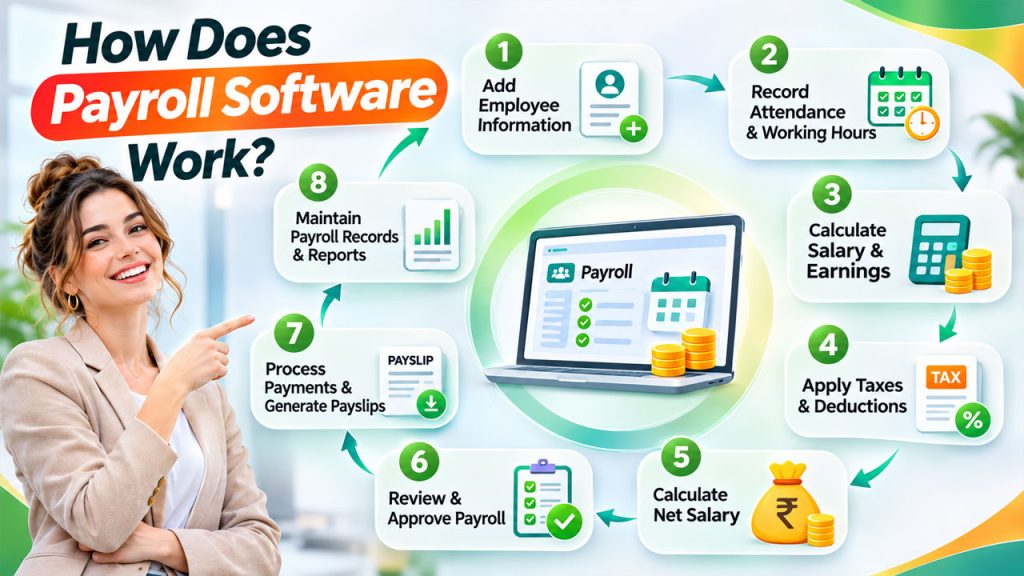
Understanding how payroll software works becomes easier when you look at the complete payroll cycle. Although features vary between platforms, most solutions follow a similar process.
1. Employee Information Is Added to the System
The first step involves entering employee information into the payroll platform. HR teams create employee profiles containing salary details, joining dates, department information, tax details, and payment preferences.
This information becomes the foundation for future payroll calculations.
For example, if an employee receives a fixed monthly salary along with a transportation allowance, the system stores both components. HR professionals can update these details whenever an employee receives a promotion, salary revision, or additional benefit.
Keeping employee records updated helps ensure that salary calculations remain accurate.
2. Attendance and Working Hours Are Recorded
The next step involves collecting employee attendance and working-hour information. Depending on the organization’s requirements, this data may come from attendance management tools, biometric devices, timesheets, or employee time-tracking applications.
An automated payroll system can connect attendance information with payroll records, reducing the need for HR professionals to enter working hours manually. Businesses can streamline this process through attendance and payroll integration, helping ensure verified working-hour records are available for accurate payroll preparation.
For instance, when an employee works additional hours, the recorded overtime information can be used during salary calculations according to the organization’s policies.
The system can also consider approved leaves, unpaid absences, and other attendance-related adjustments.
3. Salary and Earnings Are Calculated
Once employee information and attendance records are available, the platform calculates the employee’s earnings.
These calculations generally include:
- Basic salary
- House rent allowance
- Transportation allowance
- Performance bonuses
- Overtime payments
- Sales commissions
- Other company-approved benefits
The system combines the applicable salary components to calculate the employee’s gross earnings.
For example, an employee with a monthly basic salary of ₹30,000 and additional allowances of ₹8,000 would have gross monthly earnings of ₹38,000 before applicable deductions.
This process makes payroll software useful for businesses managing different salary structures across departments.
4. Taxes and Other Deductions Are Applied
After calculating gross earnings, the system determines applicable deductions.
Depending on the country and employment regulations, these may include income tax, provident fund contributions, insurance deductions, professional tax, and other statutory or company-approved deductions.
A reliable payroll platform allows businesses to configure deduction rules according to applicable regulations and employee circumstances.
In India, for example, organizations may need to account for applicable Provident Fund (EPF), Employee State Insurance (ESI), professional tax, and income tax requirements.
HR teams should ensure that the system’s tax settings and statutory rules are updated regularly. The software supports calculations, but businesses remain responsible for verifying compliance. Regular payroll compliance reviews can help businesses identify calculation errors, monitor changing tax requirements, and maintain accurate payroll records.
5. Net Salary Is Calculated
Once earnings and deductions have been processed, the system calculates the employee’s final payable amount.
The basic calculation is:
Net Salary = Gross Earnings − Total Deductions
For example:
| Salary Component | Amount |
| Basic salary | ₹30,000 |
| Allowances | ₹8,000 |
| Gross earnings | ₹38,000 |
| Total deductions | ₹4,000 |
| Net salary | ₹34,000 |
This calculation gives HR and finance teams a clear picture of how much each employee should receive.
Using online payroll management, businesses can also review payroll summaries, identify unusual salary variations, and verify payment information before final approval.
6. Payroll Is Reviewed and Approved
Before salaries are released, payroll administrators generally review the generated payroll reports.
They may check:
- Incorrect attendance records
- Missing employee information
- Unexpected deductions
- Overtime calculations
- Salary revisions
- Bonus and incentive amounts
- Total payroll expenses
Many platforms include approval workflows that allow payroll administrators, HR managers, and finance teams to review salary information before processing payments.
This additional verification step helps prevent avoidable mistakes.
7. Employee Payments and Payslips Are Generated
After approval, the payroll team initiates salary payments through the organization’s supported payment process.
Depending on the platform and available integrations, payments may be facilitated through bank transfer integrations or exported payment instructions.
The system can also generate digital payslips containing salary details, earnings, deductions, and net payable amounts.
Employees can access their payslips through an employee self-service portal if the organization provides this feature.
This reduces repetitive HR requests and makes salary information easier to access.
8. Payroll Records and Reports Are Maintained
The final step involves maintaining payroll documentation and generating reports.
A well-organized payroll processing software solution stores historical payroll information, payment records, deduction details, and other relevant documentation.
HR and finance teams can use these records to review salary expenses, prepare financial reports, track payroll trends, and support audits.
Maintaining organized records also makes it easier to investigate payroll discrepancies and respond to employee questions.
Key Features of Payroll Software HR Teams Should Know
Not every payroll platform offers the same capabilities. However, several features can make payroll administration more efficient.
Employee Database Management
A centralized employee database stores salary information, personal details, job roles, and other employment records.
Automated Salary Calculations
The system calculates earnings, deductions, overtime, and net salaries based on configured payroll rules.
Attendance Integration
Integration with attendance and time-tracking applications helps HR teams use working-hour information during payroll calculations.
Tax and Compliance Management
Payroll tools support applicable tax calculations, statutory deductions, and compliance documentation. Businesses must still verify regulatory updates and filing requirements.
Payslip Generation
Digital payslips provide employees with transparent information about their earnings and deductions.
Payroll Reporting and Analytics
Reports help HR and finance teams understand payroll expenses, employee compensation, deductions, and monthly salary trends.
Employee Self-Service
Employees may be able to download payslips, view payment history, and access selected payroll information without contacting HR.
Benefits of Using Payroll Software for HR Teams
Implementing payroll software can improve several aspects of HR operations.
1. Reduces Manual Administrative Work
Manual salary calculations and spreadsheet updates consume valuable time. Automation helps HR teams complete repetitive payroll activities faster.
2. Improves Calculation Accuracy
Using predefined salary structures and deduction rules reduces the risk of calculation errors caused by manual data entry.
3. Saves Time During Payroll Cycles
HR professionals can manage employee information, attendance records, and salary calculations through a centralized platform rather than switching between multiple documents.
4. Supports Better Compliance Management
A suitable payroll solution helps organizations maintain records and apply relevant payroll rules. Regular updates and human verification remain essential.
5. Improves Employee Experience
Timely salary payments, accessible payslips, and transparent deductions help employees understand their compensation.
6. Supports Business Growth
As organizations hire more employees, managing salaries manually becomes increasingly difficult. A scalable payroll management system helps businesses handle growing employee databases and more complex payroll requirements. A structured salary processing workflow helps businesses manage employee compensation, deductions, attendance inputs, and payslips more efficiently.
How to Choose the Right Payroll Software
Selecting the right solution requires understanding your organization’s payroll requirements.
Consider these factors before making a decision:
1. Business Size: Choose a platform that can support your current workforce and future hiring plans.
2. Ease of Use: HR professionals should be able to manage employee information and payroll activities without unnecessary complexity.
3. Integration Capabilities: Check whether the platform integrates with attendance management, HRMS, accounting, and employee management applications.
4. Security: Payroll information contains sensitive employee and financial details. Look for access controls, encryption, secure backups, and appropriate data protection measures.
5. Compliance Support: Ensure that the solution supports the applicable tax and statutory requirements for your business locations.
6. Reporting Features: Select a platform that provides useful payroll summaries, employee-level reports, and financial insights.
7. Customer Support: Reliable technical support can help resolve payroll issues during critical processing periods.
Before purchasing, businesses should compare available features, pricing structures, implementation requirements, and customization options.
Common Challenges Payroll Software Can Help Address
HR departments often face several challenges when managing payroll manually.
Some common problems include:
- Incorrect salary calculations due to outdated spreadsheets.
- Delays caused by missing attendance information.
- Difficulty tracking employee deductions and allowances.
- Repeated employee requests for payslips.
- Inconsistent payroll records across departments.
- Challenges managing payroll for multiple locations.
Modern payroll solutions help address these issues by centralizing information, standardizing calculations, and improving access to payroll records.
However, software cannot automatically resolve every payroll challenge. Incorrect employee information, poorly configured salary rules, and outdated compliance settings can still create problems. Regular reviews and proper system management are important.
Conclusion
Payroll management involves much more than transferring salaries to employee bank accounts. It requires accurate employee information, attendance tracking, salary calculations, statutory deductions, payment processing, and proper documentation.
Understanding how payroll software works helps HR teams recognize opportunities to simplify these responsibilities. From recording employee attendance to generating payslips and maintaining payroll reports, a suitable platform can make the entire payroll cycle more organized and efficient.
For businesses looking to improve HR operations, investing in the right payroll solution can reduce repetitive administrative work, improve payroll accuracy, and support long-term workforce management.
The key is to choose a system that matches your organization’s requirements, integrates with existing HR processes, and can grow alongside your business.
Frequently Asked Questions
How does payroll software calculate employee salaries?
Payroll software calculates salaries using employee salary structures, attendance records, overtime, allowances, bonuses, and applicable deductions. It combines these details to determine gross earnings and the final net salary.
Is payroll software suitable for small businesses?
Yes. Small businesses can use payroll solutions to simplify salary calculations, maintain employee records, generate payslips, and manage payroll documentation without depending entirely on manual spreadsheets.
Can payroll software manage employee attendance?
Many payroll platforms integrate with attendance management systems, biometric devices, and time-tracking applications. This allows HR teams to use working hours, overtime, and leave information during payroll calculations.
Is payroll software the same as an HR management system?
No. Payroll software primarily focuses on employee compensation, deductions, and salary processing. An HR management system generally covers broader activities, including recruitment, attendance, employee records, performance management, and leave administration. Some platforms combine both capabilities.
What should businesses consider before choosing payroll software?
Businesses should evaluate ease of use, pricing, employee capacity, security, compliance support, integration options, reporting features, and customer support. The right solution should meet current payroll requirements while supporting future business growth.